Sekatan dari SKMM kepada server seperti Filesonic,Fileserve,Wupload dan lain-lain menyebabkan ramai User tidak dapat download secara penuh atau file jadi rosak dan laman tersebut disekat. Maklumat ini sekadar perkongsian yang di ambil dari Seekfingers untuk melepasi tahap keselamatan dari SKMM.
This steps works for me until today (as at 14.06.2011) to access all the SKMM blacklisted address.
ISP: P1 Wimax
Proxy: 100% not using proxy in any method
Web Browser: Firefox 4.0.1
~ Result: ~
- Accessable to any filehoster (SKMM already blacklisted) + UL & DL.
- Torrent? piece a donut @ karipap. http @ https encryption? no problem
- Most targeted are Fileserve, Piratebay, Megaupload.. few steps below can bypass although i'm not virtually p**n.. ahakz
- Bottom line is as tom already said "block macam mana sekalipun aku dan rakan-rakan IT yang lain still leh masuk"
Windows 7 steps (mirror.. mirror on the wall, hope this steps will unblock you all)
00: shortcut: press Windows+R then type ncpa.cpl
01: go to Start > Control Panel > choose Network & Internet > Network & Internet > Network & Sharing Center
02: on your left side there is a link "Change Adapter Settings" and click
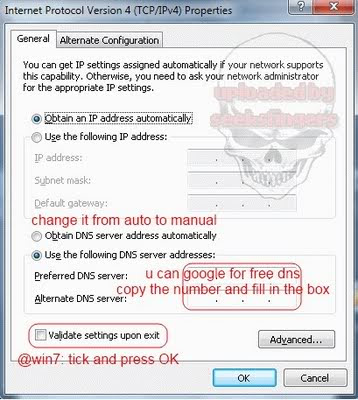
03: right-click on you local area connection > choose properties and it will pop out as you see in picture above
04: choose the Internet Protocol version 4 (not TCPIP v6)
05: google for any free dns on the net, copy the number and fill in the box (big circle in red)
06: CHECK the "validate" box and ready to rumble the SKMM internet road block!
Windows XP steps (mirror.. mirror on the wall, hope this steps will unblock you all)
00: shortcut: press Windows+R then type ncpa.cpl
01: right-click on you local area connection > choose properties
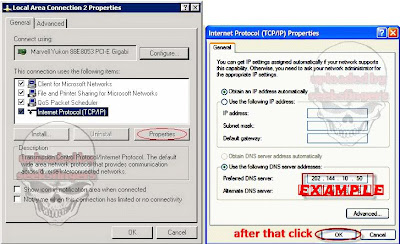
02: highlight Internet Protocol then press the Propeties button (as shown in PICTURE 1) and a window will pop out as shown in the next picture
03: google for any free dns. contoh : KLIK SINI on the net, copy the number and fill in the example box
04: press ok and get ready to rumble the SKMM internet road block!